
A better prompt is only the beginning.
You ask your agent to build a feature. The result looks plausible, but it misses the behavior you had in mind. You explain the missing pieces, fix one thing, discover another, and spend the rest of the session steering.
Often, the missing ingredient is a shared understanding of the work. A single request leaves a lot for the agent to decide: who the feature serves, what happens when something goes wrong, what the interface should do, and how to prove it works.
An AI coding workflow is a repeatable sequence of instructions, outputs, and review points. It tells your agent what to do next, which context to use, what to produce, and when to hand a decision back to you.
Our example: Fieldnotes
Throughout this guide, we’ll use a fictional client feedback portal. The feature is simple to describe: “Let clients review and approve a design.” But can a client approve an old version? Can they change their mind? Who is allowed to approve? Those are product decisions worth making before building.
You can run this process manually, delegate it through a folder of instructions, or manage it in CTRL+SPC. The tool changes. The need for clear decisions and review stays.
Choose how you want to run it.
Start with the simplest method you’ll actually use. You don’t need a new tool to start planning more clearly.
| Method | Best when | You manage |
|---|---|---|
| Saved prompts | You’re learning the process or changing it often. | The sequence, context, and review handoffs. |
| A workflow folder | You want a reusable process alongside your project. | The files, current decisions, and human approvals. |
| CTRL+SPC | You want work, reusable stages, and agent conversations in one place. | The workflow design, scope, and decisions that need your judgment. |
Method 1: keep a prompt for each step.
Save these nine stage prompts in your notes or project files. Give your agent one at a time with the current outputs and decisions. They follow the same sequence as the downloadable folder; you manage the handoffs manually.
Follow along with your own feature.
Start by giving your agent the master instruction. Then work through the 9 stages below, one at a time. Expand a stage, add your details beneath the prompt, and copy it into your agent. Each copy includes only that prompt and its details.
Replace any bracketed reminders before sending. Attach or reference the approved files at each handoff. Stages 1 and 2 include your review and corrections. Try the result yourself and explicitly approve it or explain what needs to change. Stage 9 is your final test of the working feature.
Your details stay on this page and are included when you copy. They aren’t saved when you reload; keep your completed prompts in your own notes.
Start here: master instruction
Coordinate this workflow for the feature the user describes. Read the project’s instructions, then follow the nine stages in order. Use a fresh subagent for every stage and every return to a stage; give it these master instructions, its stage prompt, the feature brief, relevant project context, and the latest artifacts and user decisions. You coordinate the work and relay questions; stage subagents do the work. For Stage 6, launch the three reviewers in parallel, then use a fresh subagent to reconcile their findings. If agent limits prevent this, ask the user rather than substituting a self-review.

Keep outputs together in a task-specific project folder and maintain a short status.md with the current stage, artifact paths, user decisions, and next action. Follow each stage’s review and return instructions, update existing artifacts, and repeat checks affected by corrections. Wait for real user approval where requested. Stop for missing answers or access; never claim unperformed work passed. Respect project permissions, preserve unrelated work, and keep credentials out of artifacts. This workflow ends with user acceptance, not deployment or publication.

I will supply one stage prompt at a time. Wait for that prompt before beginning a new stage. The sequence is: 1. Write user stories and requirements; 2. Build an interactive mock; 3. Check for misalignment; 4. Apply corrections; 5. Write the implementation plan; 6. Run three parallel adversarial reviews; 7. Implement; 8. Test the implementation end-to-end; 9. Hand off for user testing.1. Write user stories and requirements
Use the user’s feature description and project context to write user-stories.md and requirements.md. Describe the intended experience, happy paths, relevant edge cases, and clear acceptance criteria. Ask about missing decisions instead of guessing. Do not implement the feature yet.

Ask the user to review both documents. Apply their corrections and repeat the review until they approve the current version, then continue to Stage 2.2. Build an interactive mock
If the feature has a UI, use the approved stories and requirements to build an interactive mock with sample data and the project’s existing visual style. Make the important interactions and states usable, and tell the user how to try it. If the feature has no UI, record that this stage is not applicable and continue to Stage 3.

Ask the user to review the mock. Apply their corrections and repeat the review until they approve it. Record any requirements discovered while trying the mock, then continue to Stage 3.3. Check for misalignment
Compare the current mock, user stories, requirements, and approved review decisions. Identify missing behavior, contradictions, and assumptions; if there is no UI, check the stories and requirements against each other. Save a short alignment-check.md listing any mismatches.

Pass the findings to Stage 4. Do not silently change an approved product decision.4. Apply corrections
Use alignment-check.md to correct the mock, stories, and requirements so they agree. Ask the user to resolve conflicting product decisions and review any changed behavior. If there are no corrections, continue directly to Stage 5.

After corrections, return to Stage 3 for a fresh alignment check. Continue to Stage 5 once the artifacts agree and any changed behavior has been approved.5. Write the implementation plan
Read the aligned stories, requirements, and mock, then inspect the relevant code and project instructions. Write implementation-plan.md describing the smallest complete change that achieves the agreed behavior. Reuse existing code and patterns; avoid unrelated work and unnecessary abstractions.

Include the order of work, affected areas, and how the implementation will be tested end-to-end. Resolve missing decisions with the user, then pass the plan to Stage 6 without implementing it.6. Run three parallel adversarial reviews
Have three fresh subagents independently review the same plan in parallel. Give each the stories, requirements, mock where applicable, project instructions, and relevant code. Every reviewer must challenge both whether the plan will achieve the required behavior and whether it is the simplest complete approach. Ask for concrete findings supported by evidence.

Reconcile the findings in plan-review.md. Send valid issues to Stage 5 for correction and repeat the three parallel reviews on the revised plan. Continue to Stage 7 when no valid blocking findings remain; ask the user to resolve product decisions rather than guessing.7. Implement
Implement the reviewed plan using the approved stories, requirements, and mock. Follow the project’s instructions, reuse existing patterns, and preserve unrelated work. Keep the changes limited to this feature.

If implementation reveals an incorrect requirement or plan, return to the stage that owns it and repeat the affected reviews. Otherwise summarize what changed and how to run it, then continue to Stage 8.8. Test the implementation end-to-end
Run the actual implementation and test the agreed user journeys from start to finish, including relevant errors, permissions, and edge cases. Use the real browser, app, or interface appropriate to the feature, plus the project’s existing automated checks. A mock or passing unit test alone is not end-to-end proof.

Record what ran, the results, and any missing access in test-results.md. Send defects to Stage 7 and retest the corrected behavior. Continue to Stage 9 when the required checks pass; if testing is blocked, ask for what is needed instead of claiming success.9. Hand off for user testing
Give the user the working result, how to open it, and a short list of scenarios to try with expected outcomes. Mention any known limitations plainly, then wait for their feedback.

Route defects back to Stage 7 and repeat Stage 8 before asking the user to retest. Route changes to the intended behavior back to Stage 1. Finish when the user confirms the result meets their needs; do not treat silence as acceptance.Make each handoff concrete.
Give the next prompt the approved files, the relevant project instructions, and the exact task. Ask for a named output and a clear stopping point. “Continue” is much less useful than “Compare these stories and requirements with the approved mock, and list any misalignment.”
This method gives you direct control, but you are the coordinator. If the conversation gets long, start a fresh session with a short brief and the current artifacts. An artifact is simply a saved output—such as your stories, mock, or plan—that the next step can use.
Method 2: hand your agent a workflow folder.
Once the prompts are useful, put them in a folder such as new-feature-workflow. Add a master instruction file that describes the sequence, the outputs, the review gates, and what to do when a review sends work back.
The master file gives your main agent a coordinating role. For each stage, it launches a fresh subagent—a separate agent session—and hands it the relevant instructions and current inputs. The stage agent does the work; the coordinator preserves the result and decides which permitted step comes next.

The folder: 11 simple documents
simple-coding-workflow/
  START-HERE.md
  README.md
  stages/
    01-user-stories-and-requirements.md
    02-interactive-mock.md
    03-check-alignment.md
    04-apply-corrections.md
    05-implementation-plan.md
    06-adversarial-plan-reviews.md
    07-implement.md
    08-end-to-end-testing.md
    09-user-testing.md
Master Agent Instructions
Coordinate this workflow for the feature the user describes. Read the project’s instructions, then follow the stages below in order. Use a fresh subagent for every stage and every return to a stage; give it these master instructions, its stage file, the feature brief, relevant project context, and the latest artifacts and user decisions. You coordinate the work and relay questions; stage subagents do the work. For Stage 6, launch the three reviewers in parallel, then use a fresh subagent to reconcile their findings. If agent limits prevent this, ask the user rather than substituting a self-review.

Keep outputs together in a task-specific project folder and maintain a short status.md with the current stage, artifact paths, user decisions, and next action. Follow each stage’s review and return instructions, update existing artifacts, and repeat checks affected by corrections. Wait for real user approval where requested. Stop for missing answers or access; never claim unperformed work passed. Respect project permissions, preserve unrelated work, and keep credentials out of artifacts. This workflow ends with user acceptance, not deployment or publication.

## Stages

1. Write user stories and requirements (stages/01-user-stories-and-requirements.md)
2. Build an interactive mock (stages/02-interactive-mock.md)
3. Check for misalignment (stages/03-check-alignment.md)
4. Apply corrections (stages/04-apply-corrections.md)
5. Write the implementation plan (stages/05-implementation-plan.md)
6. Run three parallel adversarial reviews (stages/06-adversarial-plan-reviews.md)
7. Implement (stages/07-implement.md)
8. Test the implementation end-to-end (stages/08-end-to-end-testing.md)
9. Hand off for user testing (stages/09-user-testing.md)
A fresh context can keep a stage focused, but only if the handoff contains what it needs. Too little context causes guessing; forwarding everything recreates the original overload. Include the decisions and artifacts relevant to the stage, and let the agent ask for what is missing.
Want the complete version? The free Simple Coding Workflow includes master agent instructions, a short user guide, and 9 stage files, from stories and requirements through user testing. It runs the same nine stages as the copyable prompts above, with review and correction built in. Unzip it, give the folder to your agent, and ask it to start with START-HERE.md. You can keep the folder in your codebase.
Method 3: run the workflow in CTRL+SPC.
CTRL+SPC gives your process a home alongside the work. A project holds related work; a work item describes the outcome; a workflow arranges the stages an agent should follow.
For Fieldnotes, that means a project for the client portal, a work item called “Let clients review and approve a design,” and a reusable workflow called “Feature from idea to acceptance.” The work item carries the specific request. The workflow carries how you want work to proceed. This is a sample project with fictional data.
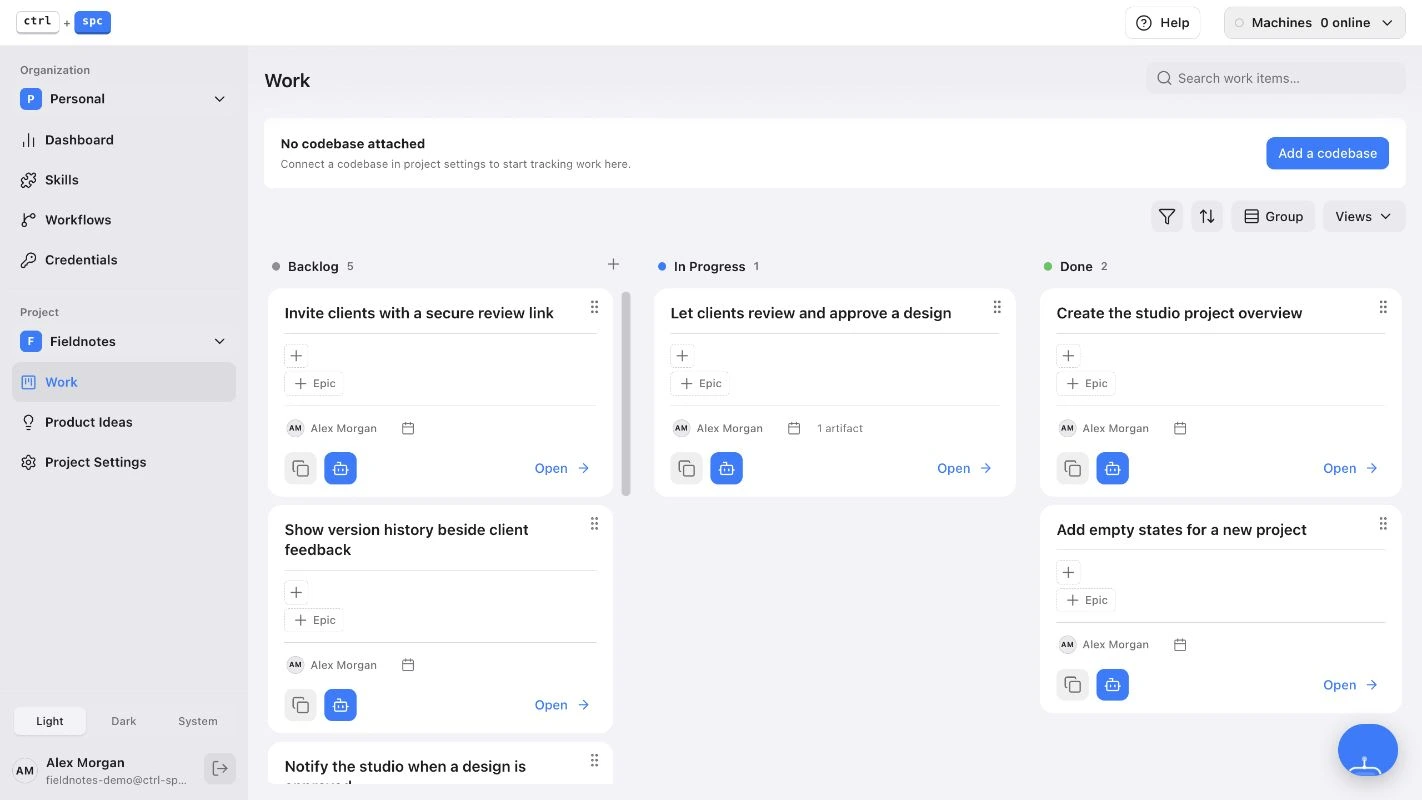
Put the process beside the request.
- Write the work item. State who the feature is for, the outcome you want, and any constraints you already know.
- Choose or create a workflow. Use the nine stages below as a starting point: stories and requirements, mock, alignment, corrections, plan, plan reviews, implementation, agent testing, and user testing. Give each stage instructions and a condition for moving forward.
- Make reviews explicit. Describe when a stage must return for changes and when the user needs to make a decision.
- Give the work and workflow to your agent. In the agent conversation, attach the work item and the workflow so the agent receives both the request and the process.
- Review the actual outputs. Check the stories, try the mock, answer open questions, and test the result. A stage label alone is not proof that the feature works.
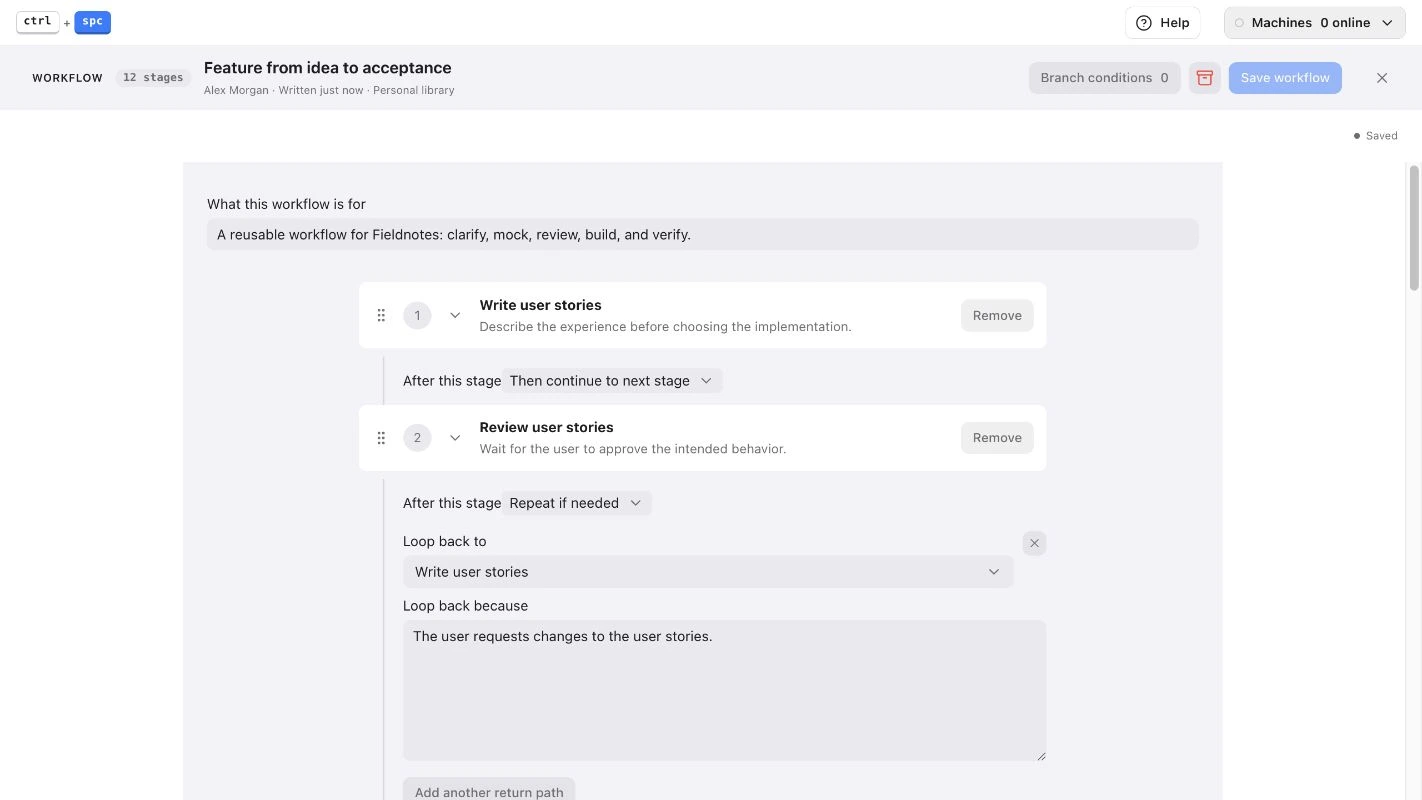
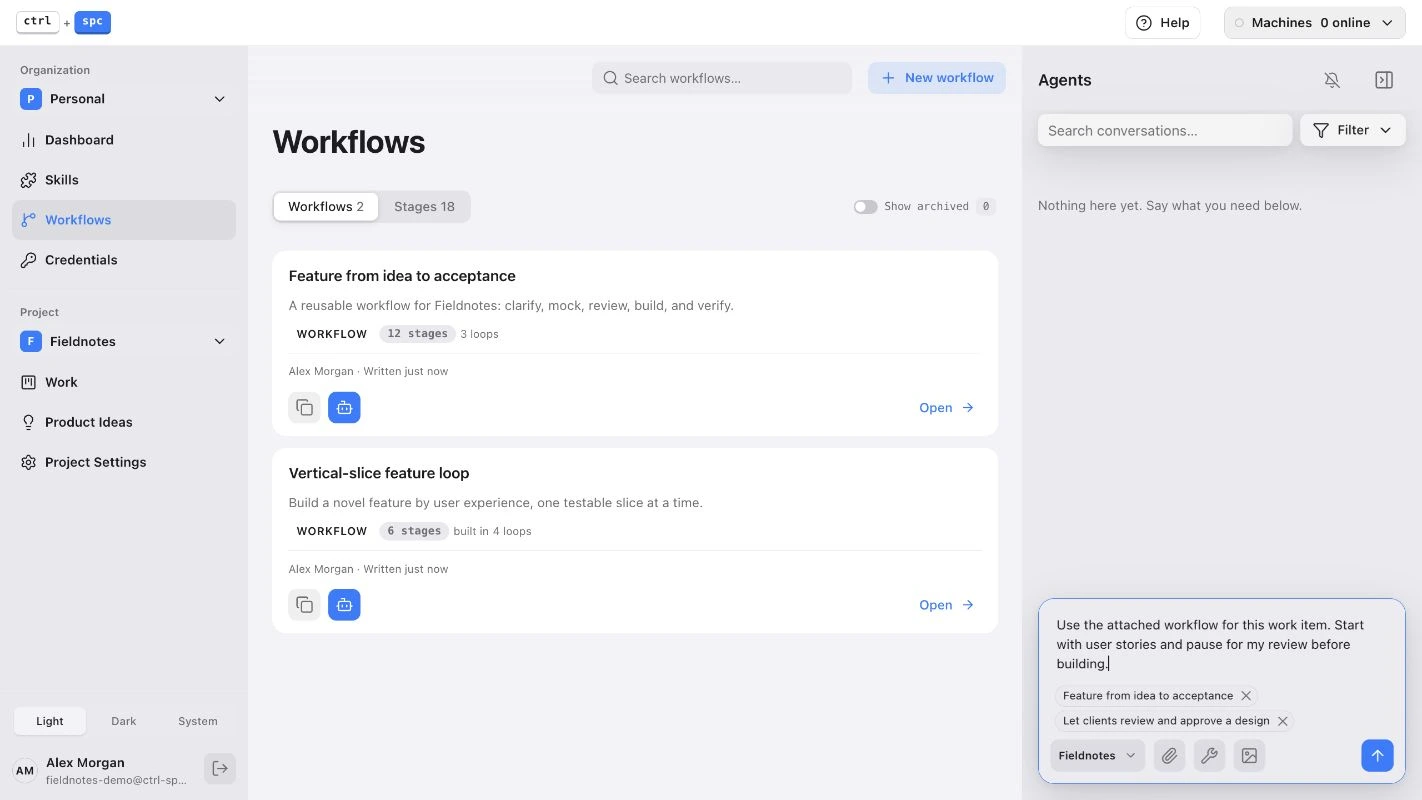
You still work with your own coding agent. CTRL+SPC keeps the work, instructions, and review context organized; your judgment supplies the product decisions. Use stage instructions to make the handoffs as specific as the folder method.
Use the mock to discover what you missed.
A picture can show you a layout. An interactive mock lets you try the decisions inside it. This is often where an apparently simple feature becomes clear.
In Fieldnotes, you click “Approve design.” Then you switch to a newer version. Should the approval still appear? Try leaving feedback after approval: does that reopen the review, add a comment, or require an explicit request for changes?

Ask the agent to make the mock functional enough to exercise the important paths. You should be able to click, change state, and see what follows. This does not require a production backend.
- Try the normal path: open the latest design, leave feedback, approve it.
- Try the awkward path: open an old link, switch versions, attempt an action without permission.
- Try failure and recovery: what does the user see if a comment fails to save?
When you find a missing rule, update the user stories and mock together. Approval should mean “this describes the experience we want,” not just “the screen looks nice.”
A repeatable workflow for a new feature.
These are the nine stages used by both the downloadable folder and the copyable prompts above. Reviews and corrections are part of the stages, and the workflow ends with user testing.
- Write user stories and requirements.
Describe the intended behavior and acceptance criteria. Ask the user to review both documents, apply corrections, and wait for approval.
- Build an interactive mock.
If the feature has a UI, build a usable mock with sample data. Ask the user to try it and correct it until approved. Skip the mock when there is no UI.
- Check for misalignment.
Compare the mock, stories, requirements, and user decisions. List contradictions and missing behavior.
- Apply corrections.
Resolve the findings and ask the user about changed product decisions. Repeat the alignment check after corrections; skip corrections if none are needed.
- Write the implementation plan.
Inspect the codebase and plan the smallest complete change, including how to test the real result.
- Run three parallel adversarial reviews.
Three fresh subagents review the same plan in parallel. Every reviewer judges whether it meets the stories and requirements and whether it is simple. Correct valid issues and repeat the reviews.
- Implement.
Build the reviewed plan, following the project’s existing patterns. Return to an earlier stage if a requirement or plan needs to change.
- Test the implementation end-to-end.
The agent runs the actual implementation and tests complete user journeys, including relevant failures and permissions. Fix defects and retest before handoff.
- Hand off for user testing.
Give the user the working result, opening instructions, and scenarios to try. Address their feedback and finish when they confirm acceptance.
Make “done” something you can check.
Gherkin is a readable way to describe behavior using Given a starting situation, When an action happens, and Then an expected result. You don’t need to be a programmer to review it.
Example: approving a design version
Scenario: A new version needs its own approval
  Given a client has approved design version 2
  When the designer uploads version 3
  Then version 2 keeps its approval record
  And version 3 is shown as awaiting review
  And the client can review and approve version 3 separately
That is much more testable than “handle approvals correctly.” Use it to discuss the behavior, then ask the agent how its tests will demonstrate it. For a release, add deployment checks and verify the deployed result too; local acceptance and production verification are separate steps.
Isn’t this a lot of work—and tokens?
It can be. Planning, reviewing, and running additional agents have a real cost. The question is whether they reduce the more expensive cycle of building the wrong thing and rebuilding it.
In my experience, the upfront effort often pays off in fewer missing behaviors and less rework. That is not a guarantee of lower token usage on every task. A straightforward copy change may need a clear request and a quick check. A new approval system deserves more thought.
Measure the whole job: how long it takes to reach an accepted result, how many correction rounds it needs, and what breaks afterward. Saving one planning turn is not much of a saving if it creates five implementation turns.
Match the workflow to the change.
A feature workflow is a starting point, not a process to force onto every task. Keep reusable workflows for different kinds of uncertainty.
| The work | What the workflow should establish |
|---|---|
| Debugging | Reproduce the issue, identify the cause, make a scoped fix, and verify the original failure no longer occurs. |
| Production deployment | Verify readiness, authorization, recovery steps, and the behavior of the actual deployed result. |
| Functional change without UI | Specify inputs, outputs, permissions, failure behavior, and integration tests. Skip a UI mock when there is no interface decision. |
| Refactoring | State which behavior must stay the same and what evidence will show it stayed the same. |
| Web and iOS | Define shared product behavior and platform-specific interactions, implementation, and testing. |
For multiple platforms, either maintain a workflow for each or give a shared workflow explicit platform branches. “Works on the web” does not answer whether it works on a phone.
A few practical questions.
Do I need CTRL+SPC to use a workflow?
No. Start with saved prompts or the downloadable folder. CTRL+SPC is another way to organize the work and the instructions you give your agents.
Should every step use a new agent?
The master instructions use a fresh subagent for each stage, including returns for corrections. Stage 6 uses three reviewers in parallel. With saved prompts, you supply each stage and its context manually; with the folder, the coordinator follows the files.
What if my agent cannot launch subagents?
These master instructions expect subagent support. Without it, you can manage fresh agent sessions yourself, including three independent parallel reviews at Stage 6. That is a manual adaptation; a single agent’s self-review does not replace the three reviews.
What should I do when the mock changes?
Update the affected stories and requirements, then revisit any plan or test that depended on the old behavior. Keep one current version of each artifact so the next agent knows what was actually approved.
Make your next build more deliberate.
Start with one real feature. Clarify the experience, try the mock, and give your agent a process it can follow.
The free folder contains master agent instructions, simple user instructions, and nine short stage files. Share the folder with your agent and include a brief feature description.
Get the free workflow